
DD-WRT HD2.4.4 - App Store
You'll be able to see results in few seconds.
Publisher Description
--- FEATURED ON Mac Geek Gab's 'Cool Stuff Found' ---
Great app 5*
I've only had this app for about 5 min. And I love it already. Does everything I need and is perfect for wake on LAN.
-------------
Amazing 5*
This is really a great app, ive been following the project on DDWRT forums for some time and im so happy its out and exceeds my expectations. Well done!
-------------
...I fell in love with this app right away, ...As such, I'd recommend this app...
Peter Redmer - myopenrouter.com
-------------
The highly praised DD-WRT app now comes to the iPAD
*NEW* - Now with the ability to add home screen icons that instantly issue Wake On LAN commands, Reboot your router or Enable/Disable your Wifi MAC Filter. Truly 1 touch actions - *NEW*
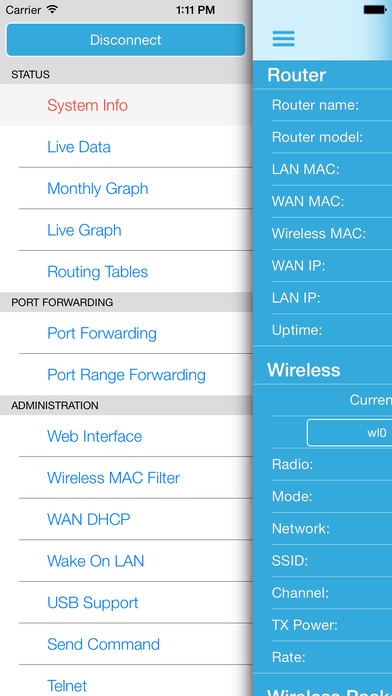
This DD-WRT app is the easy way to manage and monitor your DD-WRT enabled routers both locally and remotely.
Anyone that has tried using the DD-WRT web interface on an iPhone/iPod will know that some pages are impossible to navigate to.
Get easy access to stats including:
System Information,
Wireless settings
Wireless Packet Info
Memory
Routing tables
USB Disk Info
Get easy access to Live Data including:
LAN Live Clients,
Active Wireless Clients
Daily WAN Traffic Graph
Active Bandwidth Graphs for WAN, LAN and Wireless
Directly Change Settings including:
Port Forwarding & Port Range Forwarding - You can add/edit/delete/enable/disable port forward rules of your router
Wireless MAC Filter
Wireless on/off toggle
DHCP Release/Renew
USB
OpenVPN
Send Commands remotely including:
Wake On LAN
Reboot
Command line commands
More features including:
Direct links to web interface pages.
Directly connected and authorised telnet client.
Use the MAC Filter to easily block devices from your WiFi.
Localised in English, German, Russian, French, Japanese, Chinese & Korean
Please contact me if you can translate this app into more languages or help with current languages.
*** There are 3 versions of this app available on the App Store. The LITE version is for you to test compatibility. The other 2 versions are now exactly the same (DD-WRT & DD-WRT HD) so you can purchase either ***
-----------------------------------------------------------
THIS APP WILL ONLY WORK IF YOU HAVE A ROUTER THAT HAS BEEN FLASHED WITH DD-WRT FIRMWARE
Please feel free to contact me if you want additional features added or have any problems.
This DD-WRT app uses the web interface of your DD-WRT enabled router, so please make sure you have this enabled.
Accessing your router remotely (away from the local network) requires you to know the WAN IP address and port of your network OR to have a DDNS address setup that forwards to your network. (You can set up DNS forwarding at www.dyn.com)
DD-WRT has many different versions, so if you have any problems accessing any data please get in touch using the Feedback button so we can look at adding more support.
About DD-WRT router firmware:
http://www.dd-wrt.com
"DD-WRT is a Linux based alternative OpenSource firmware suitable for a great variety of WLAN routers and embedded systems. The main emphasis lies on providing the easiest possible handling while at the same time supporting a great number of functionalities within the framework of the respective hardware platform used."
Requires iOS 7.0 or later. Compatible with iPhone, iPad, and iPod touch.
About DD-WRT HD
The company that develops DD-WRT HD is Dappitude Limited. The latest version released by its developer is 2.4.4.
To install DD-WRT HD on your iOS device, just click the green Continue To App button above to start the installation process. The app is listed on our website since 2013-03-20 and was downloaded 0 times. We have already checked if the download link is safe, however for your own protection we recommend that you scan the downloaded app with your antivirus. Your antivirus may detect the DD-WRT HD as malware if the download link is broken.
How to install DD-WRT HD on your iOS device:
- Click on the Continue To App button on our website. This will redirect you to the App Store.
- Once the DD-WRT HD is shown in the iTunes listing of your iOS device, you can start its download and installation. Tap on the GET button to the right of the app to start downloading it.
- If you are not logged-in the iOS appstore app, you'll be prompted for your your Apple ID and/or password.
- After DD-WRT HD is downloaded, you'll see an INSTALL button to the right. Tap on it to start the actual installation of the iOS app.
- Once installation is finished you can tap on the OPEN button to start it. Its icon will also be added to your device home screen.
Program Details
System requirements
Download information
Pricing
Version History
version 2.4.4
posted on 2013-03-20
Disclaimer
Official App Store Link
We do not host DD-WRT HD on our servers. We did not scan it for viruses, adware, spyware or other type of malware. This app is hosted by Apple and passed their terms and conditions to be listed there. We recommend caution when installing it.
The App Store link for DD-WRT HD is provided to you by apps112.com without any warranties, representations or guarantees of any kind, so access it at your own risk.
If you have questions regarding this particular app contact the publisher directly. For questions about the functionalities of apps112.com contact us.
